
The contact page is often one of the least considered parts of a website.
It rarely gets the same design attention as the homepage or the same depth of copywriting as a service page. Yet it is one of the most important points in the conversion journey. It is where interest becomes action, or where a potential enquiry quietly disappears.
After reviewing hundreds of websites across ecommerce and lead generation, I have seen the same issues appear again and again. Contact forms are unclear. Calls to action are vague. Mobile experiences feel awkward. Response expectations are missing. Trust signals disappear at the exact point where reassurance matters most.
That is the frustrating part. A business can invest heavily in SEO, PPC, content, social media and design, only to lose people at the point they are ready to make contact.
The good news is that contact page optimisation is usually practical, focused and measurable. You do not always need a complete redesign. In many cases, small improvements to wording, layout, reassurance and tracking can make it much easier for people to take the next step.
Watch the short version
Be clear with your calls to action
The word “Submit” is still everywhere online, but it rarely helps anyone.
It tells the user what the button does technically, but not what happens next. That might sound like a small detail, but button copy matters because it appears at the moment someone is deciding whether to act.
Clearer calls to action reduce uncertainty.
If someone is enquiring about a service, phrases such as “Request a callback”, “Send my enquiry” or “Book a consultation” are more specific. They tell the user what kind of action they are taking and what they can expect afterwards.
For ecommerce and product-led websites, the wording may need to be different. “Ask about this item”, “Check availability” or “Request product advice” can feel more relevant than a generic contact form button.
The point is not to be clever. It is to be clear.
A good contact page should answer the user’s unspoken questions: am I in the right place, what should I do next, and what will happen after I send this?
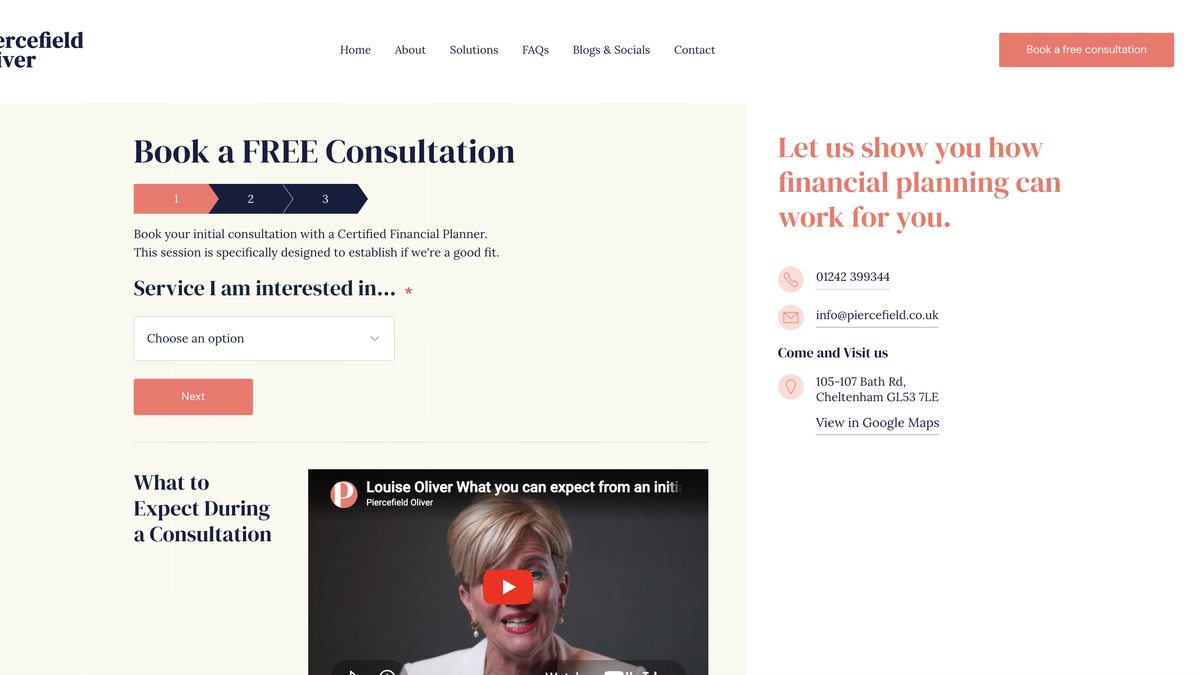
Add trust where it matters
By the time someone reaches your contact page, they are often close to making a decision.
That is exactly when reassurance matters. Yet many contact pages strip everything back so far that they feel cold, empty or transactional. The user is asked to hand over their details without being reminded why they should feel comfortable doing so.
Trust signals do not need to be heavy-handed. They simply need to remove doubt.
Useful additions can include:
- A short testimonial that mentions responsiveness, helpfulness or service quality
- Accreditation logos, memberships or relevant certifications
- A short line explaining when the user can expect a reply
- A named person, team reference or friendly photo where appropriate
- A reminder of the types of enquiries you can help with
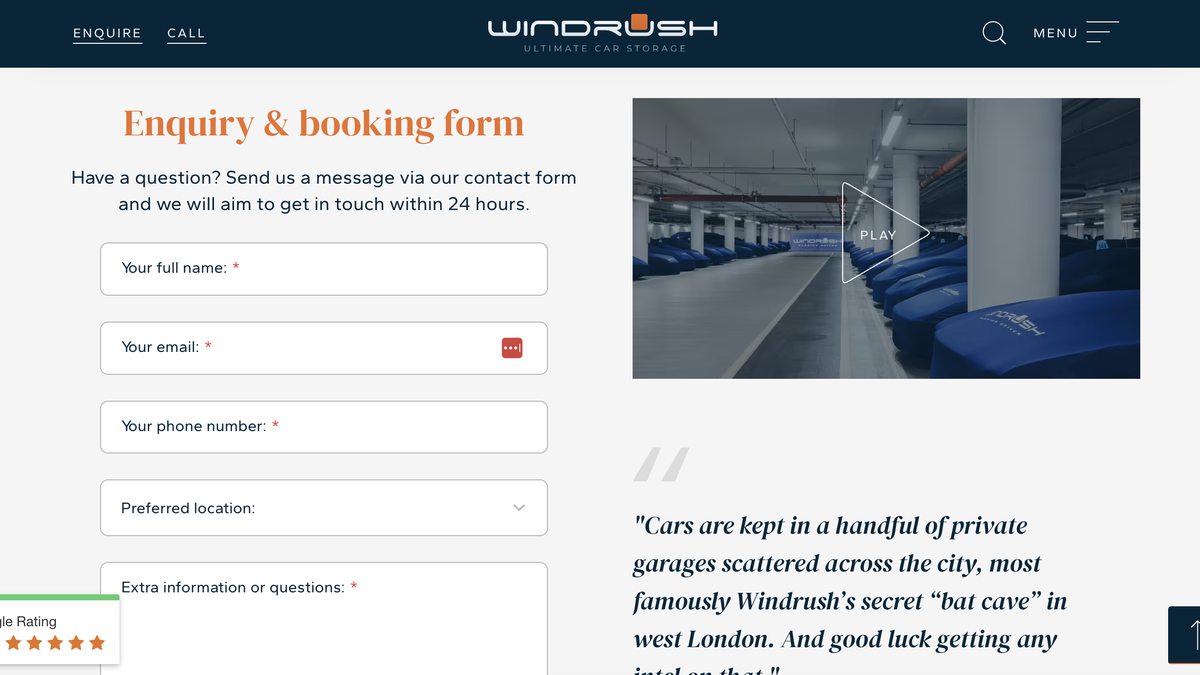
This is not about cluttering the page. It is about placing reassurance close to the point of action.
A line as simple as “Send us a message and someone from the team will reply within one working day” can make the page feel more human and more reliable.
Check the mobile experience
A contact page that works on desktop can still fail badly on mobile.
That matters because many users will reach the page from a phone, especially after clicking from search, paid ads, maps, social media, email or referral links. If the form is awkward to use, the buttons are too small, or the page loads slowly, some of those users will not try again later. They will leave.
I always recommend testing the contact page on a real phone, not just resizing a browser window.
Look for practical issues:
- Is the form easy to scroll through?
- Are labels and fields easy to read?
- Are buttons large enough to tap comfortably?
- Does autofill work properly?
- Does the keyboard type match the field, such as email keyboard for email address?
- Does the page load quickly on mobile data?
- Is the phone number tappable?
These details are easy to overlook, but they affect whether someone completes the enquiry or gives up halfway through.
Mobile conversion problems are often not dramatic. They are small moments of friction that add up.
Keep the form simple
Every extra form field creates a little more resistance.
That does not mean every contact form should be stripped down to name, email and message. Some businesses need more information to qualify enquiries properly. The key is to only ask for what is useful at that stage of the journey.
A good test is to look at every field and ask: do I need this before I reply, or can it wait until the conversation has started?
If the answer is that it can wait, consider removing it.
Long forms can still work when the user is highly motivated, but they need to earn that effort. A high-value B2B enquiry may justify more qualification. A simple product question probably does not.
It also helps to make the form feel easy before someone starts. Clear labels, sensible field order, helpful error messages and visible privacy reassurance can all reduce hesitation.
The form should feel like a straightforward next step, not an admin task.
Offer the right contact options
Not everyone wants to use a form.
Some users prefer to call. Others may want email, live chat, WhatsApp or a booking link. The right options depend on the business, the audience and the type of enquiry.
The mistake is assuming one route suits everyone, or offering every possible route without thinking about intent.
A high-intent enquiry often needs speed. If someone is ready to book, buy, visit or speak to a person, hiding the phone number behind a form can create unnecessary friction. A more considered B2B enquiry may need the opposite: a clear form, a sensible response time and enough space for the user to explain what they need.
Ecommerce contact pages need a different kind of judgement again. A customer asking about delivery, stock or returns may not need to speak to sales at all. In those cases, a prominent FAQ link, order support route or product-specific enquiry option can prevent the contact page from becoming a dumping ground for every possible question.
That is the sharper point: contact options should help route intent, not just increase choice.
Too many options can make the page feel messy. Too few can force users into a route that does not suit the urgency or nature of their enquiry. The best contact pages make the next step feel obvious.
Response expectations matter here too.
If you provide a form, say when people should expect a reply. If you list a phone number, include opening hours. If you use live chat, make it clear when it is available.
Silence creates doubt. Clear expectations create confidence.
Measure and refine
Your contact page should not be treated as a set-and-forget part of the website.
It deserves the same attention as any other conversion point, especially if you are investing in SEO, PPC or other channels that send users towards it.
At a minimum, you should know how many people reach the page and how many complete the form. For lead generation websites, I would also want to know which channels drive the highest-quality enquiries, not just the highest number of submissions.
Useful things to review include:
- Contact page visits
- Form completion rate
- Form errors or failed submissions
- Clicks on phone numbers, email links or chat buttons
- Conversion rate by device
- Conversion rate by traffic source
- Lead quality after submission
This is where contact page optimisation becomes more than design preference.
If mobile users reach the page but do not complete the form, there may be a usability issue. If paid search users submit lots of poor-fit enquiries, the problem may be traffic quality, form wording or qualification. If users abandon after an error message, the form itself may be blocking conversions.
Measurement helps you find the friction rather than guess at it.
Practical contact page checklist
Before making large changes to the wider website, it is worth checking the basics.
-
Is the main call to action specific? Replace generic wording like “Submit” with language that explains the action or outcome.
-
Does the page explain what happens next? Give users a clear response time and tell them what to expect after they enquire.
-
Are trust signals visible near the form? Add reassurance where people are making the decision, not hidden elsewhere on the site.
-
Is the mobile experience genuinely easy? Test the page on a real phone and complete the form as if you were a customer.
-
Can any fields be removed? Only ask for information that is genuinely needed before the first reply.
-
Are alternative contact routes clear? Make sure phone, email, chat or booking options are easy to find where relevant.
-
Is conversion tracking working properly? Check that form submissions, phone clicks and other contact actions are measured accurately.
-
Are you reviewing lead quality? More enquiries are not always better if they are poor fit. Contact page performance should be judged by quality as well as volume.
This checklist is simple, but it covers the points where many websites lose enquiries unnecessarily. For design inspiration beyond the examples above, Awwwards’ contact page collection is worth browsing, though as always, visual decisions should follow conversion intent, not lead it.
Final perspective
The contact page is where a lot of marketing effort either pays off or quietly leaks away.
A visitor may have found you through search, clicked an ad, read a service page, compared your offer and decided they are interested. If the final step feels unclear, impersonal or awkward, some of that intent will be lost.
That is why contact page optimisation matters.
Clear calls to action, visible reassurance, smooth mobile usability, simple forms and accurate measurement all help more of the right people take the next step.
The fix is rarely about making the page more complicated. It is usually about removing doubt, reducing friction and making the decision to enquire feel easy.