
On 30th April 2026 I spoke at Hero Conf, widely recognised as the largest dedicated PPC and paid social conference in the UK, and co-located with brightonSEO. I was returning to speak, having presented at MeasureFest back in October, this time with a session called Spend Less, Win More Leads: a technical GA4 setup that cut ad waste by 50%. This is the case study from that talk, written up in full.
We’ve all sat in the “you’ve had X enquiries” conversation. A report lands showing plenty of form fills, the cost per enquiry looks healthy, and on paper paid search is doing its job. Then the client says something that doesn’t match the data: the leads don’t feel like new business, they suspect returning customers are clicking the ads, and they’re fielding too many enquiries from the wrong kind of buyer.
That gap, between the volume being reported and the quality the client was judging, is what the talk was about. It’s the kind of misalignment I find in a lot of accounts I’m brought in to review.
I delivered the work at SOZO for Ezi Klamp, a manufacturer supplying access, edge protection and boundary fencing into the commercial sector, think rail, schools and civils projects. You can flick through the full slide deck on SpeakerDeck if you want the visuals in order.
The short version: I cut wasted ad spend by more than 50%, intentionally reduced conversion volume, and lifted lead quality by 25.9%. None of it needed paid tooling. It was all built inside GA4, Google Tag Manager, Google Ads and Data Studio.
I also wrote up my reflections from brightonSEO and Hero Conf at the time, if you want the story around the event rather than the technical detail. You can also see my other talks and upcoming sessions.
More conversions doesn’t mean better performance
On the surface, more conversions and a lower cost per acquisition look like a win. In lead gen especially, that can be hiding a bigger problem. You can lift conversion volume by opening up targeting, loosening intent or leaning harder on campaign types like Performance Max, and a good chunk of that uplift often comes from lower-quality enquiries, existing demand, or people who were never likely to buy.
I made this same point in PPC Hero’s roundup of PPC myths every advertiser should stop believing: more conversions only count if they turn into real business. I’ve seen accounts where conversion numbers climbed month on month while the sales team grew more frustrated, because the quality wasn’t there.
The account looked fine on paper when we first took it on. It was running paid search across Google and Bing, with tracking limited to form submissions, cost per acquisition and lead volume. What the client actually cared about was new commercial enquiries from high-value sectors. Those are different measures of success, and the setup I inherited wasn’t capturing any of them. The bidding had the same blind spot. It was configured to chase volume because volume was the only signal it had.
The intent problem
Underneath all of it sits an intent problem. Take a term like “key clamps”, at roughly 2,900 searches a month in the UK. Who’s actually searching it? A site manager sourcing key clamps for a commercial rail project, or someone at home fitting a handrail in the garden after watching a YouTube video?
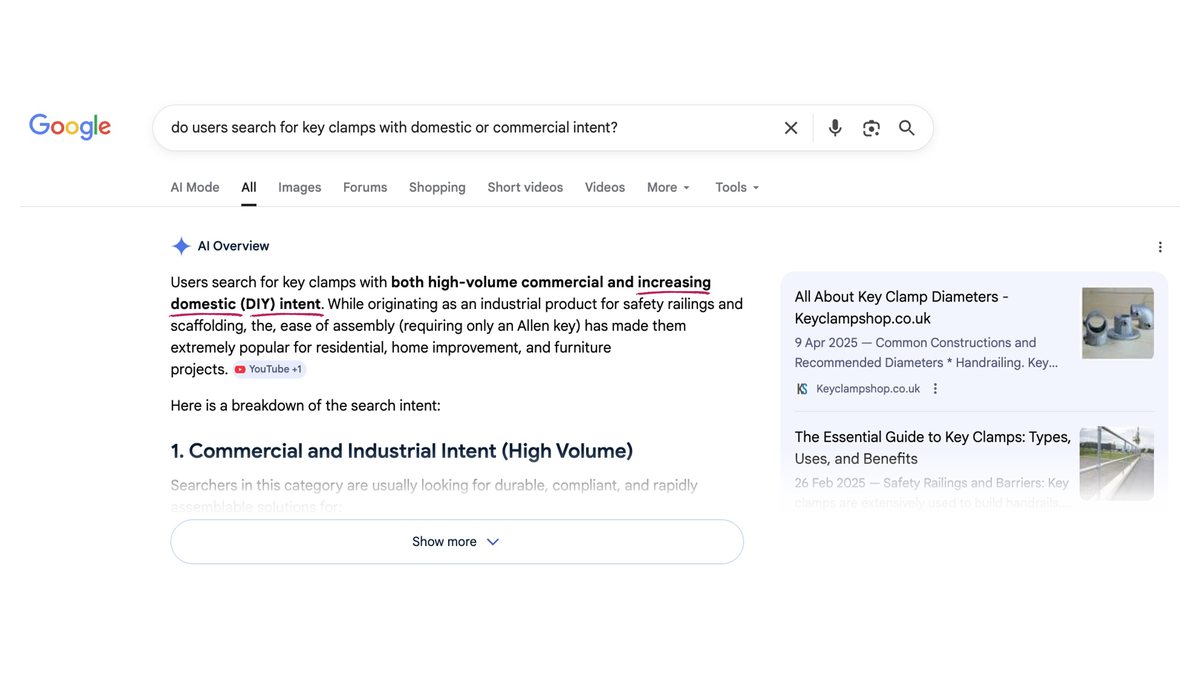
It’s both. You’ve got real commercial buyers and DIY users inside the same keyword, and Smart Bidding won’t tell them apart unless you give it the data to do so. So the principle for the whole project was simple: fix the signal, and the spend fixes itself.
Smart Bidding wasn’t broken. It was doing exactly what it had been told to do, optimising towards a definition of success that didn’t reflect the commercial reality. Once I changed that definition, I could find the wasted spend and move it towards better leads.
Step 1: define commercial value before you touch tracking
The first step had nothing to do with tracking. I mapped the keyword groups against commercial probability and priority: some were clear priorities, some were secondary, and some I deliberately chose not to target at all.
That forces a proper conversation about where the business actually wants to compete, and it anchors every decision that follows before a single tag is changed.
Step 2: upgrade the forms
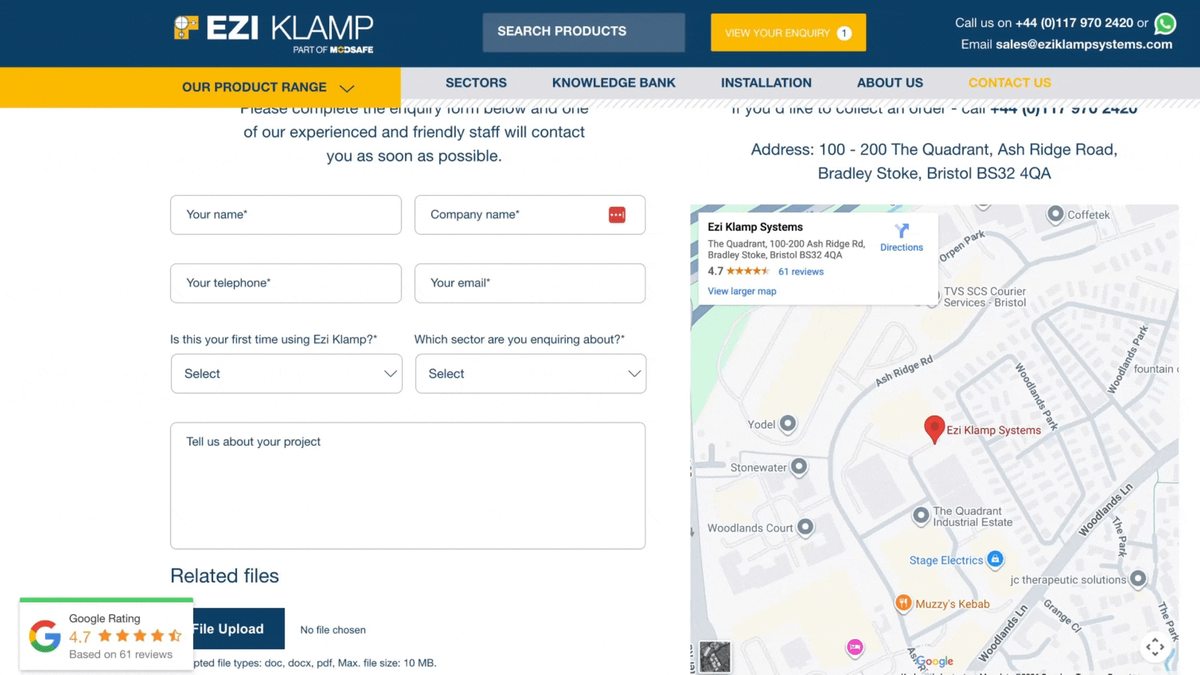
The original enquiry form had the usual fields: name, company, phone, email and a free-text box. It works, but it tells you very little about the lead at a glance, and a free-text field is hard to turn into clean, structured data.
So I added two dropdowns. One asked whether the user was a new or returning customer. The other asked which sector they were enquiring from. Those two questions speak directly to what the client was worried about, and making the company name a required field also helped quietly deter domestic DIY enquiries. Two extra fields, barely any added friction for the user, and useful new context at the point of enquiry.
Step 3: get the form data into GA4
Next I moved that form data into a place the bidding could use.
I output the selected values into the data layer on submission, with a bit of dev support to wire that up, created data layer variables in Google Tag Manager so those values could be referenced, then passed them into GA4 so every lead carried its context.
A couple of details are worth getting right. Hook into a confirmed success event, not the automatic GA4 form_submit. Here that meant the Gravity Forms gform.submit.success event in WordPress; on Contact Form 7 or a custom form you’d hook the equivalent. Validate everything in GTM’s preview mode before you trust it, using the Variables view to confirm the values are coming through as expected.
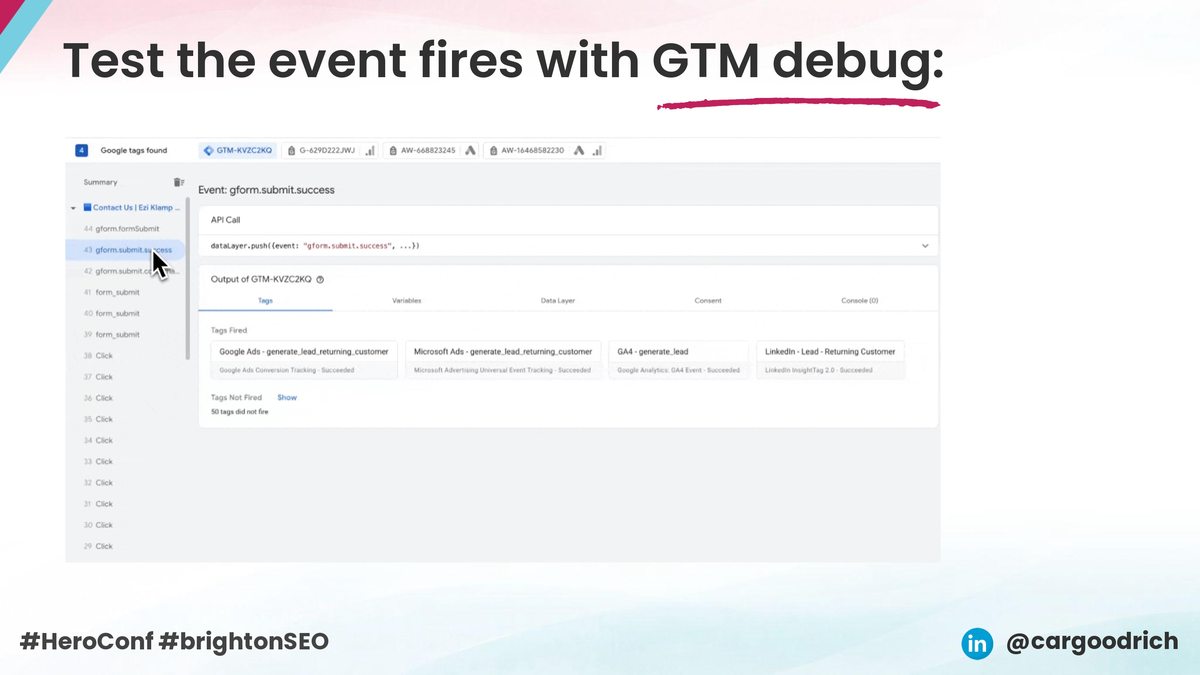
Then register the new fields as custom definitions in GA4 so they’re available downstream in reporting. That gives you a clean pipeline from what the user selected to data you can actually act on, moving from tracking leads to qualifying them. It’s the same fragility I wrote about in why GA4 attribution is too fragile to trust on its own: if the signal going in is weak, everything built on top of it is weak too.
Step 4: build reporting that qualifies, not just counts
With the data flowing, the next job is making it usable. In Data Studio, if your GA4 source is already connected, a quick Refresh Fields pulls in the new dropdown fields. Rename them so they read in plain English (first_time becomes “New Client”), then use conditional formatting to highlight what counts.
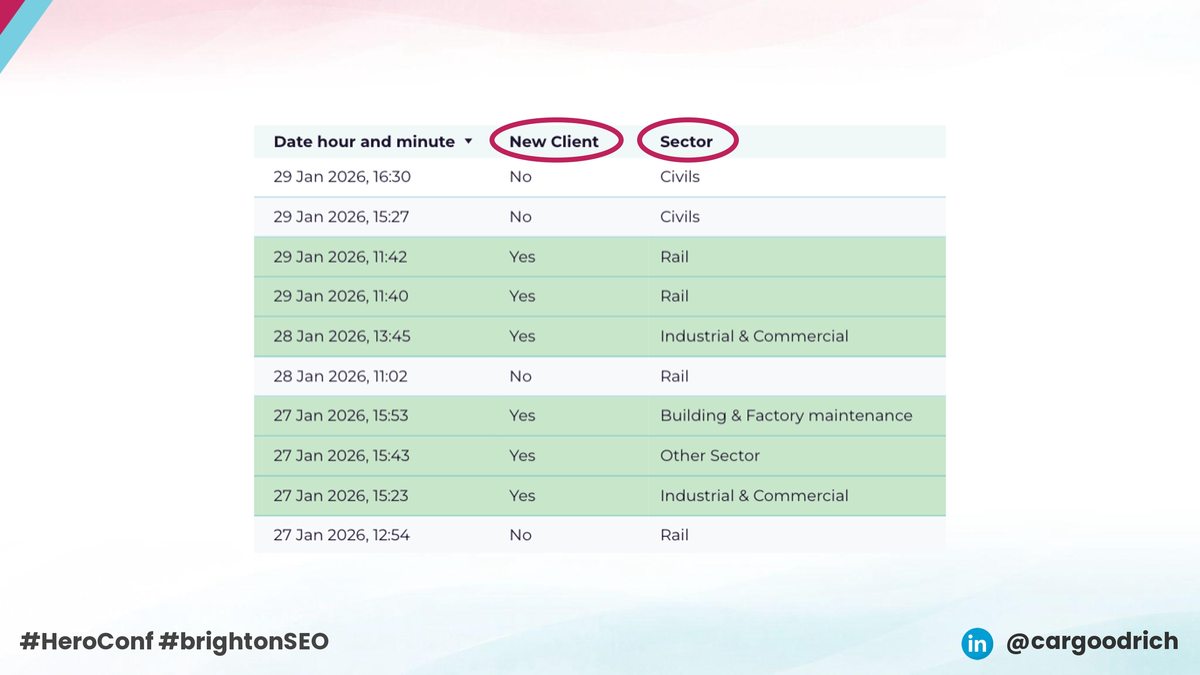
Now you can qualify a lead in seconds: new client or returning, which sector, and which source and search term drove it. In this account, that let me show paid search was driving over 68% of new client enquiries, directly overturning the assumption that paid wasn’t bringing in new commercial customers. The conversation moves from volume to value, and that’s the point where clients start to trust the channel.
Step 5: activate conversion value
This is the step most lead-gen accounts skip. Conversion value isn’t only for e-commerce. In most lead-gen setups it’s left blank, which tells Google every lead is worth exactly the same. They’re not. A new commercial enquiry from a priority sector isn’t worth the same as a returning enquiry or a file download.
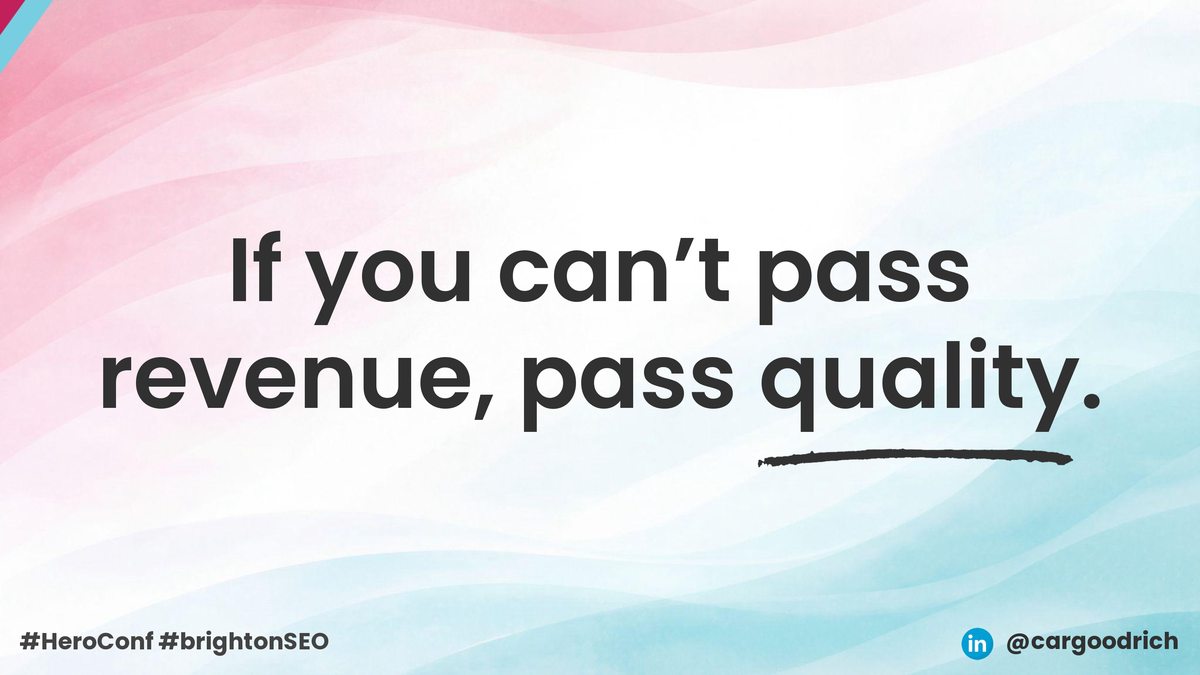
I built a simple scoring model with the client: higher-intent actions get higher values, lower-intent actions get lower ones. It doesn’t need to be perfect, it just needs to be directionally right. Those conversion values then go into Google Ads, and Microsoft Ads, through Tag Manager or the conversion settings directly. From that point the platform stops optimising for raw conversions and starts optimising for qualified ones, and you can see exactly which campaigns, ad groups and search terms drive the higher-intent leads.
The results
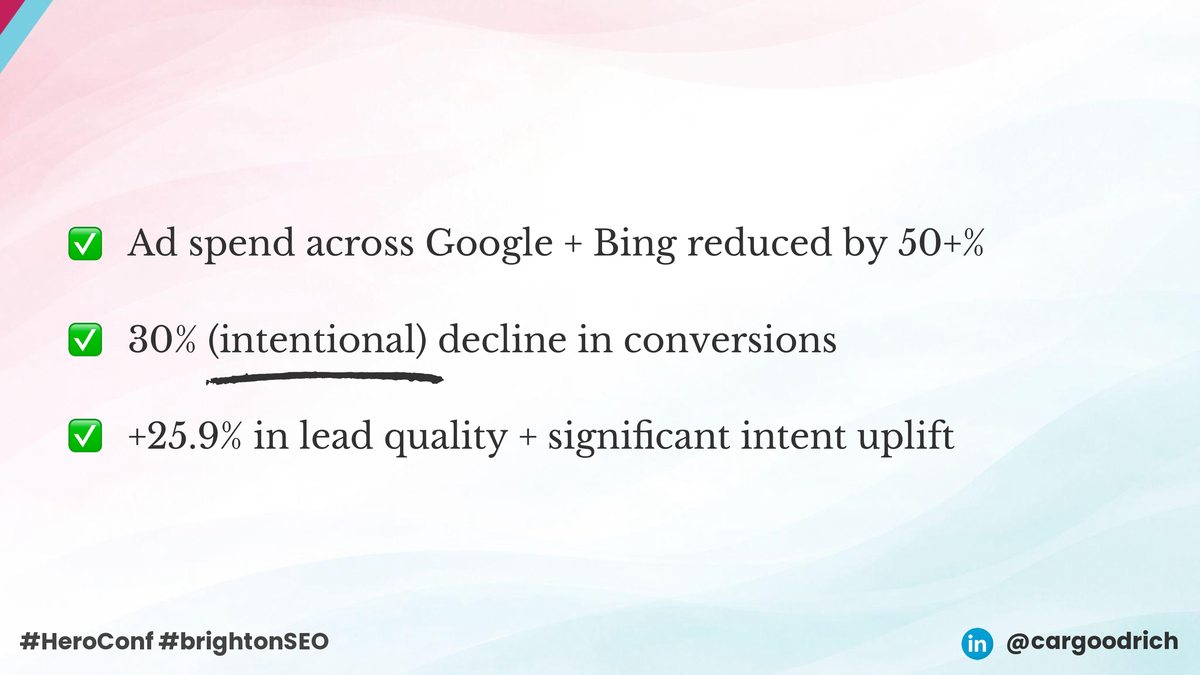
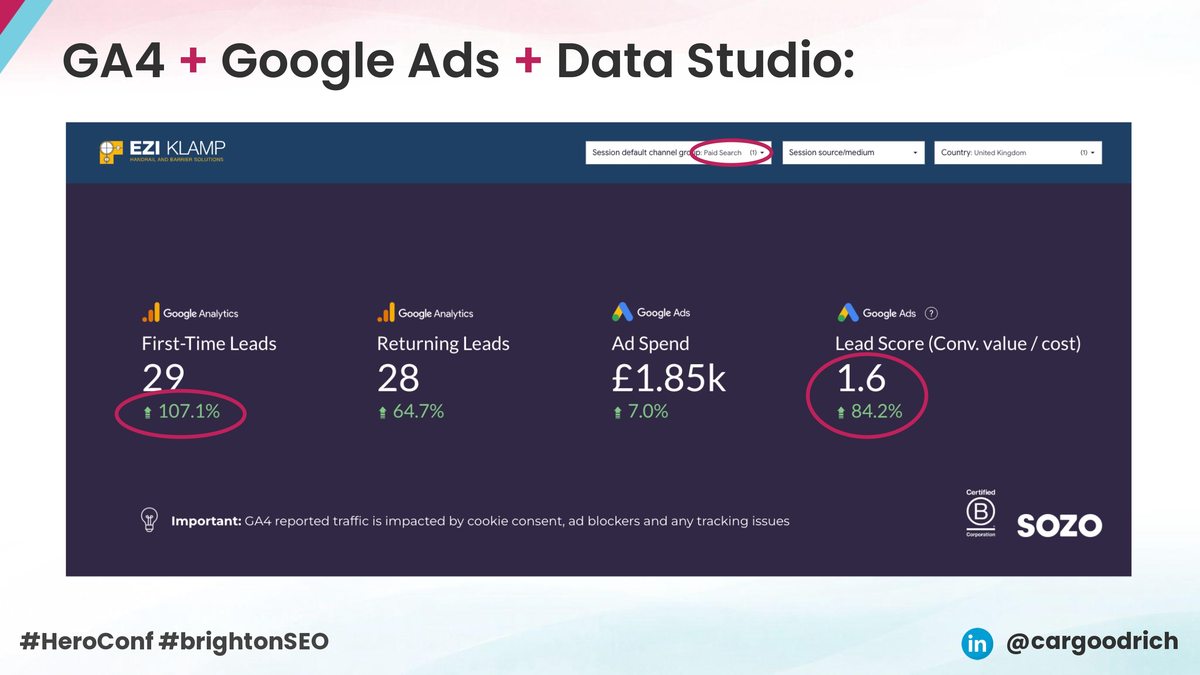
Ad spend across Google and Bing came down by more than 50%. Conversion volume dropped, deliberately, by around 30%, while lead quality improved by 25.9%. Less spend, fewer conversions, better outcomes. Looking at paid search on its own, first-time leads were up over 100% and lead value up over 80%, and I could show all of it clearly.
This is the same thinking that’s helped me save another client over £35,000 in wasted PPC spend: judge lead quality against the data inside the platform, then let the bidding act on it.
The wins beyond the numbers
The bigger shift was in the decisions that followed. No more “probably” and feel, just qualified data, which gave the client the confidence to reinvest in areas like the website and UX. A setup like this also travels. I’ve since adapted the same approach for an e-commerce client, on the lead-gen touchpoints where their sales team needs qualified enquiries rather than orders, and the same commercial thinking runs through my Black Friday and Q4 talk at brightonSEO and MeasureFest.
What about phone calls?
The honest limitation: GA4 can’t see phone enquiries, and for a lot of commercial businesses the phone still does the heavy lifting.
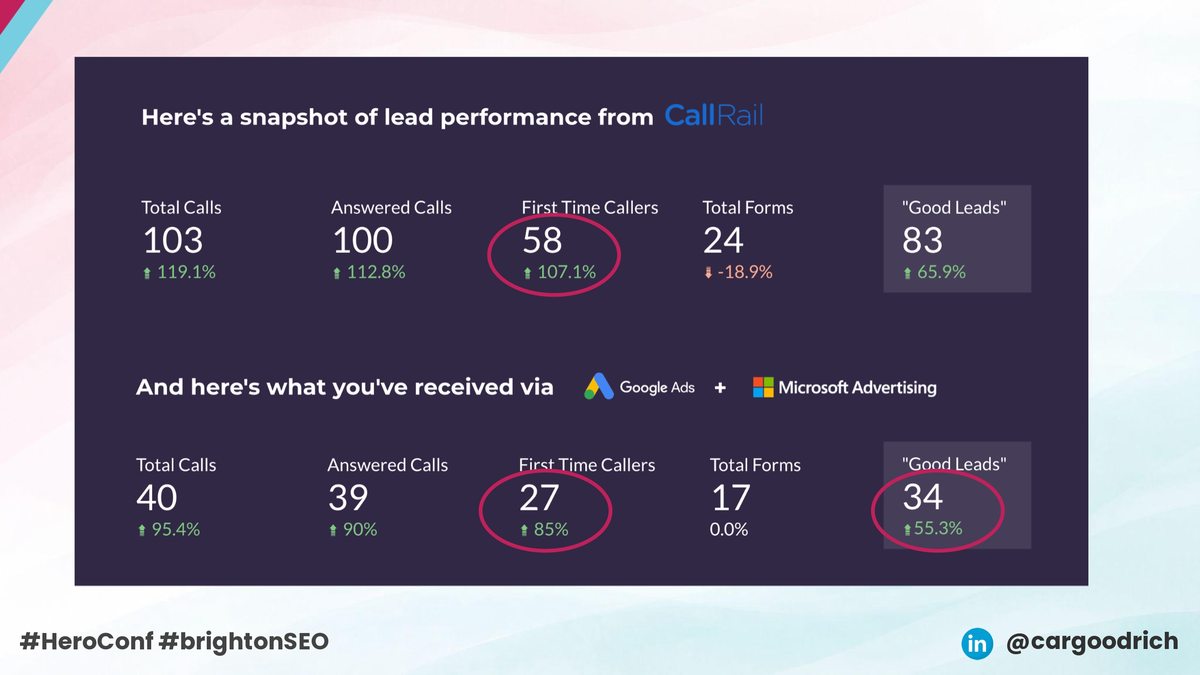
Here I used CallRail to separate new and returning callers and fed that into the same Data Studio reporting. Same principle, better signals. That’s a longer story for another time, but the thinking carries straight across.
Practical takeaways
- Define what a good lead looks like before you touch tracking: new versus returning, sector, project value, whatever reflects real commercial intent.
- Capture that definition at the point of enquiry with one or two well-chosen form fields, rather than a free-text box you can’t analyse.
- Fire conversions on a confirmed success event, not the automatic form_submit, and validate in GTM preview before trusting the data.
- Pass a conversion value even when you can’t pass revenue. A directionally right quality score beats treating every lead as equal.
- Report on lead quality, not just lead volume, so the bidding and the client are judging the same thing.
- Remember GA4’s blind spots. Phone leads usually need something like CallRail to be counted properly.
Final thoughts
More conversions only count if they turn into real business, so the job isn’t to chase more of them, but to teach the platform what a good one looks like. Do that and Smart Bidding becomes a strength rather than a liability, because it’s finally optimising towards the leads that pay the bills.
None of this needed expensive software. It needed a clear commercial definition, clean signal, and the discipline to report on quality. If your paid search looks healthy on volume but the sales team keeps telling you otherwise, that gap is where your next efficiency gain is hiding.